
Owner and Admin responsibilities
Understand role boundaries, Owner continuity and the consequences of organization access changes.
Who this is for: Owners managing access and organizers understanding their assigned role.
Reference guide
Choose a task
Screenshots use synthetic examples. Your available actions may differ by role and record state. The written instructions remain complete without images.
Use your own account and the correct role
Owners manage organization users, roles and access. Owners and Admins manage ordinary member and event workflows. Moderators have limited event-day and Vetting permissions. The app checks current access on each protected action.
A Helper flag is a member attribute and grants no account access by itself. An explicitly assigned Helper role permits only check-in and concern submission; Helpers cannot view any submitted concerns, including their own. Reading a Help guide or selecting its Owner starting path does not grant access. Super Admin is separate platform authority and has no default access to operational records or concerns.
The Helper workspace offers only check-in and concern submission. Owners explicitly grant this account role; changing the separate member Helper flag does not change sign-in permissions. Helpers cannot read concern lists, details or history, even for their own submissions.
Keep an active Owner in place
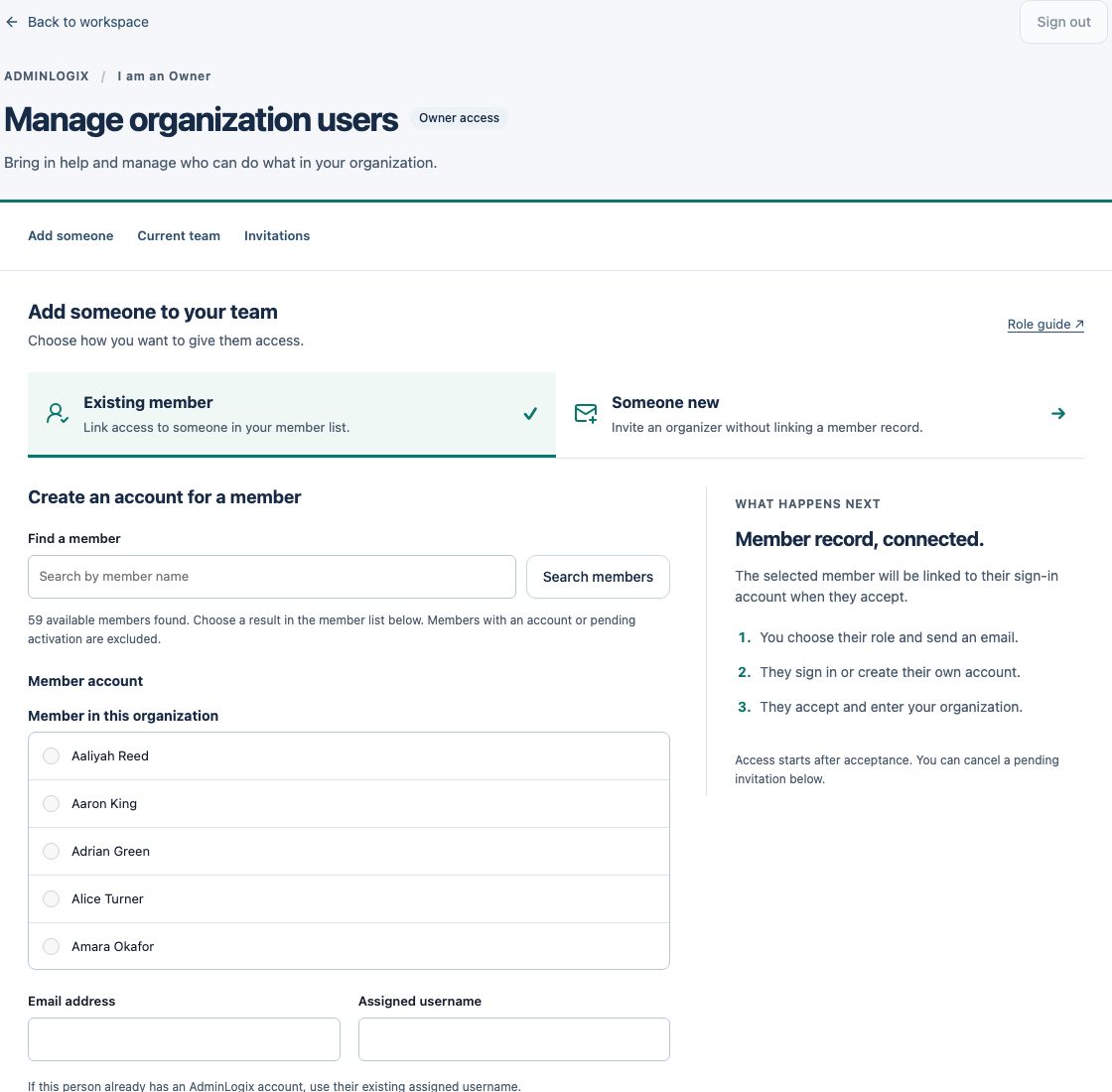
An Owner can select a member from their own organization for account setup, or invite someone directly with an assigned username and role. Open Manage organization users, enter the recipient email and chosen role, then review and send the email. Existing users sign in with their current account; new users create their own password. The recipient verifies the invited email and activates access. Owners cannot search all AdminLogix accounts or members. Existing organization users can have their role or access changed. Disabling access preserves historical attribution. Check unconfirmed delivery before canceling and replacing a setup. Super Admin authority alone does not grant access to this organization.
There must always be at least one active Owner. An Owner can leave only if another active Owner remains. Admins and Moderators can leave voluntarily. If a change conflicts with another organizer’s change, reload and review the current roles.
In Manage organization users, choose Existing member to select and link a member from this organization, or Someone new to invite an organizer without a member link. Only the selected form is shown. Pending invitations appear separately from Invitation history, which contains accepted, canceled and expired entries.
Handle restrictions and concerns deliberately
Only Owners/Admins manage member concerns and ordinary member-status changes. Closing a concern does not undo its outcome. Refunds and denied-entry reversals also have their own controls; do not assume one action reverses another.
Use a factual summary and only the detail needed for the concern. All organization Owners/Admins can view concerns in V1. Do not put passwords, sign-in recovery codes or payment-card credentials in notes.
Plan closure and retained data
An Owner’s confirmed closure starts 30 days of Inactive read/export access. Export needed records before archival. During Inactive, an Owner may request reactivation; only Super Admin approves. Archived restoration is requested outside the product during retention. After confirmation, the same organization’s read-only workspace opens. Check the Inactive banner and export deadline before planning your export.
An accelerated-deletion request can make data eligible for purge at the end of the Inactive period, subject to applicable holds. Purge is irreversible through AdminLogix. Read the lifecycle confirmation and dates carefully; Help does not replace that review.
Example: understand this in practice
Jordan has a member Helper flag but no Helper account role. An Owner separately assigns account access before Jordan can use the restricted workspace.
Names and situations are fictional.