
RSVPs, selection, confirmation and replacements
Understand how RSVPs become finalized participants, recorded responses and replacements.
Who this is for: Owners and Admins managing regular-event participation.
Reference guide
Choose a task
Screenshots use synthetic examples. Your available actions may differ by role and record state. The written instructions remain complete without images.
Review RSVPs and imports
Open the event’s RSVPs and import screen. Regular RSVPs are Going or Interested. An unknown nickname stays unmatched and does not create a member. Matching uses the current nickname.
Choose a CSV and review the compact New RSVPs, Existing RSVPs and RSVPs to restore counts. Errors and ignored columns remain visible; download the errors if needed, then choose Import Valid Rows or Cancel. There is no row-preview table. Re-uploading a removed RSVP restores the original record with the status in the file; it does not create a duplicate. People absent from the file remain unchanged.
Add or remove members quickly
Below Import, browse or search part of a nickname or name. The picker shows only available Active members, 50 per page. Select up to 50 across searches/pages and choose Add selected members, or use the plus icon for one person. Manual additions save as Going without a separate confirmation. Suspended and Banned members cannot be selected.
Saved RSVPs has a minus icon per row and checkboxes for Remove selected. Select all on this page covers only that page, up to 100. Removal preserves history; an eligible member returns to the add list. Bulk removal either succeeds for the whole selection or rolls back. Removal is unavailable after participant finalization; use the participant workflow then.
Review and finalize participation
With “Let AdminLogix recommend the attendee list” selected, generate recommendations and review capacity, Helper places, intact groups, Preferred results and target shortfalls before finalizing. You may regenerate before finalization. Targets never override eligibility or hard group/capacity constraints.
With “Let AdminLogix recommend the attendee list” turned off, use the direct-participant workflow. It still checks eligibility and records participant snapshots; turning selection off does not let Suspended or Banned members participate in regular events.
Your latest exact proposal is saved privately for this account. Opening a member, leaving or refreshing can return you to the same draw while its inputs remain current. Changed inputs require an explicit new generation; visiting never generates.
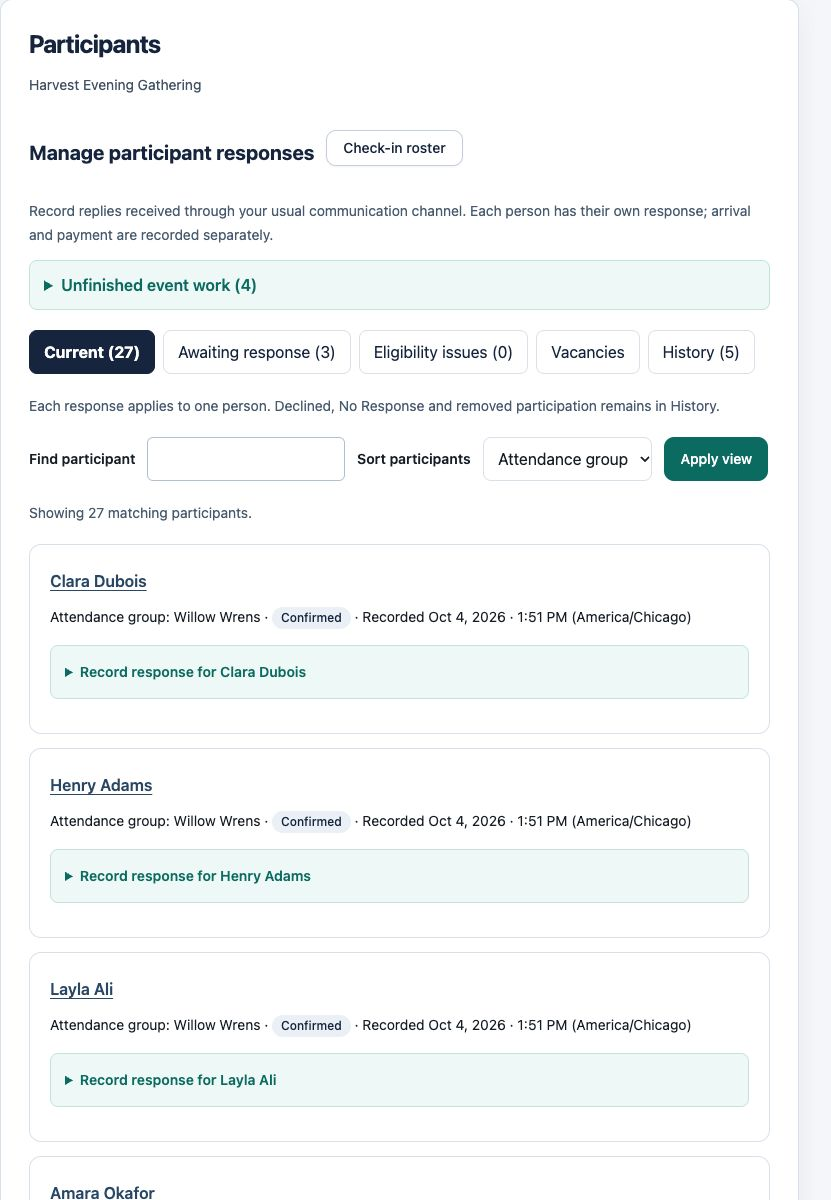
Record responses without implying messages were sent
When confirmation is enabled, record Awaiting Response, Confirmed, Declined or No Response. No Response is an organizer’s decision, not evidence that a member replied. AdminLogix does not send event-participation invitations or automatically expire event responses.
When confirmation is disabled, accepted participation is shown as confirmation not required. It is not recorded as a reply from the member.
After finalization, Current, Awaiting response and History separate active work from historical participation. Search and sort within a view. Expand Record response for a person, save and check the result in place. Another participant’s response remains independent.
Replace explicitly and keep history
Generate replacements for vacancies, review the recommendation, then approve. A replacement does not erase the original participation record. Once a replacement has filled the place, the original Declined or No Response record cannot return to Confirmed or Awaiting Response.
If a review is stale, reload and review again. Returning a restricted member to Active does not restore removed participation. An Admin Addition is a separate explicit Owner/Admin action and cannot override suspension or ban.
Use Vacancies in the participant workspace to review and explicitly approve replacements. The exact latest proposal can be restored while its inputs remain current. Add a member after finalization and Export attendees are optional sections; use your usual outside channel to contact participants.
Example: understand this in practice
Jordan’s RSVP is an expression of interest in a fictional event. Maya still reviews the participant workflow and any required confirmation before treating Jordan as an accepted attendee.
Names and situations are fictional.